Three tools. Three genuinely different approaches to improving UX. Founders and product teams keep asking which one they should be using, and the honest answer is that it depends entirely on the question you are trying to answer. Pick the wrong one and you will pay for a tool that was never built to solve your problem.
Choosing between these tools is easier once you know the job. Our complete UX audit guide frames what an audit is for, and how to do a UX audit shows the manual method behind the automated version. If your real choice is a tool versus paying a consultancy, we also compared an automated UX audit against hiring an agency.
Here is a straight comparison, with the honest limits of each one included.
How they differ at a glance
The fastest way to understand these three is to see them as answering two questions. Do you want to know what users do, or why they do it? And do you want to look at one page, or across the whole product?
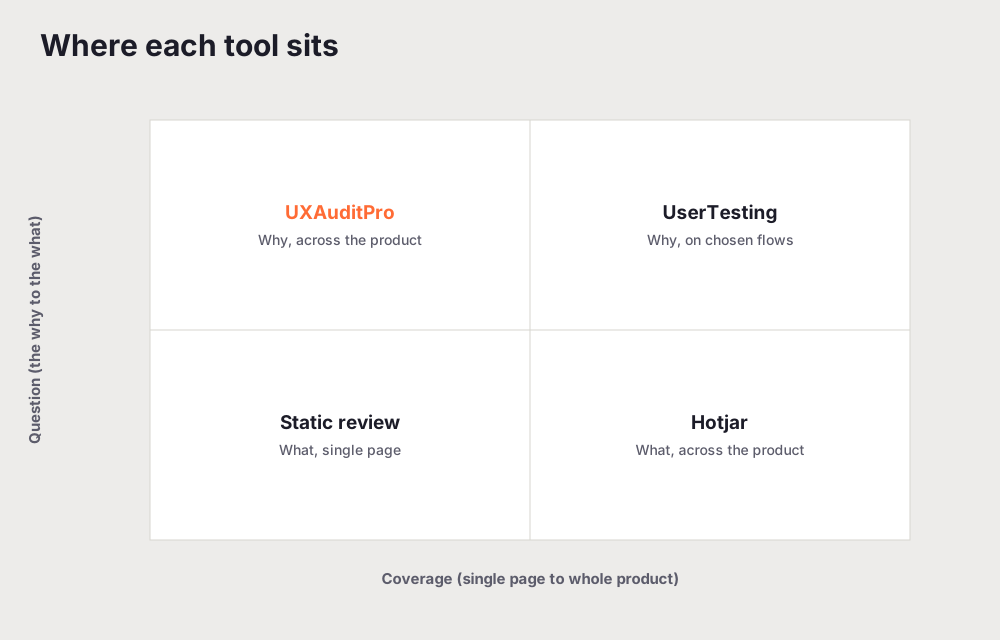
Hotjar shows you the what, across your whole live product, through heatmaps and recordings. UserTesting gives you the why, in depth, on the specific flows you choose to test. UXAuditPro sits closer to a diagnosis: it looks across the whole product and tells you what is wrong and what to fix first, without needing traffic or recruited participants. None of them is a strict upgrade on the others. They are different instruments.
Hold that framing as you read the rest. Almost every "which tool is best" argument online is really two people comparing tools that were built for different jobs, one wanting a diagnosis and the other wanting behaviour or research. Once you know which of those you actually need, the choice stops being a debate and becomes obvious. The sections below go tool by tool, then give you a decision framework and an honest look at cost.
The short version
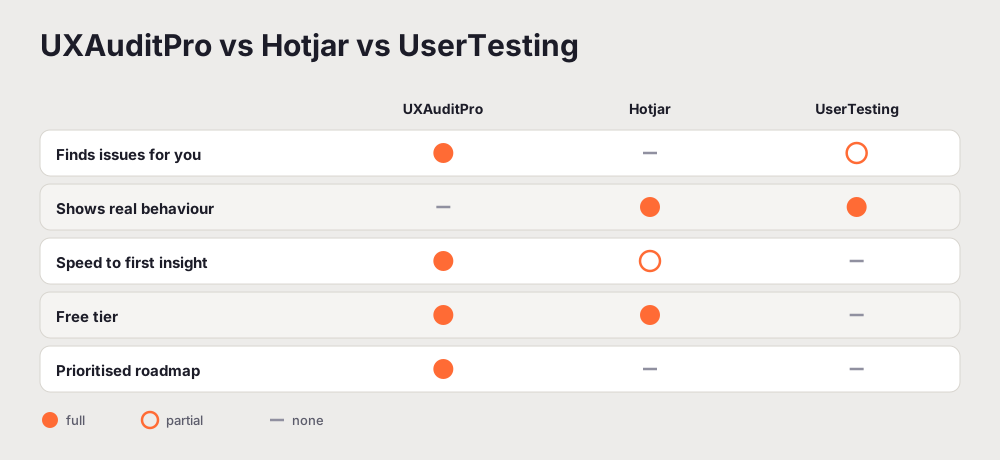
| UXAuditPro | Hotjar | UserTesting | |
|---|---|---|---|
| Best for | Fast scored audit and roadmap | Ongoing behaviour tracking | Moderated user research |
| Time to insight | Minutes | Days to weeks, needs traffic | Days |
| Requires live traffic | No | Yes | No |
| Gives you a score | Yes | No | No |
| Setup | A URL, nothing to install | Tracking script | Panel recruitment |
| Pricing shape | One free audit a month, then paid per report | Free tier, paid plans scale with traffic | Premium, quote-based |
| Best stage | Pre-launch or any time | Post-launch, ongoing | Validating specific questions |
What Hotjar does
Hotjar is a behavioural analytics tool. You install a tracking script and it records what users actually do: where they click through heatmaps, how far they scroll, and full recordings of individual sessions. It can also run on-site surveys when a user is about to leave.
Where it wins. Ground truth. When you already suspect a flow is broken, a handful of session recordings will confirm or kill the theory fast, and heatmaps are genuinely persuasive when you need to show a stakeholder that nobody scrolls to the thing they insisted on adding.
Where it falls short. Hotjar shows you the what, not the why, and not the fix. It surfaces nothing on its own: you have to know what to look for, watch a lot of sessions, and do the interpretation yourself. It also needs traffic, so it is no help before launch. It is a microscope, not a diagnosis.
When to use it. Once you are live, getting steady traffic, and want to understand behaviour patterns over time. It is a "watch what happens" tool, not a "tell me what is wrong" tool.
What UserTesting does
UserTesting is a research platform. You define a task, such as "sign up for a free trial and complete your first action", recruit participants from their panel, and get back videos of real people attempting it, often thinking aloud as they go.
Where it wins. Depth. There is no substitute for watching a real person misunderstand your product in a way you never anticipated. For testing a specific design decision or a prototype before you build it, the qualitative signal is hard to beat, and the clips are powerful to share with stakeholders.
Where it falls short. Speed and cost. Setting up a study and getting results takes days, sometimes a week, and meaningful research is expensive. It also does not give you a structured, scored overview of your product's overall health. You bring a specific question and the time to answer it properly.
When to use it. When you have a specific hypothesis to validate, such as whether a new onboarding flow reduces confusion at step three, and the budget and time to run proper research.
What UXAuditPro does
UXAuditPro is an AI UX audit tool. You give it a URL, it analyses your product across six UX dimensions, Navigation, Visual Hierarchy, Friction Points, Accessibility, Conversion Design, and Mobile UX, and returns a scored report with prioritised findings and specific recommendations.
Where it wins. Speed and structure with no traffic required. You get a consistent score across dimensions, so you can track improvement over time, and it surfaces issues you did not know to look for, accessibility especially. Because it runs on any public URL, you can point it at a competitor to benchmark. For a founder or PM who needs a prioritised action plan today, that is hard to match.
Where it falls short. It is a point-in-time audit, not ongoing monitoring, so it will not watch real sessions the way Hotjar does. It does not interview users, so it will not replace the qualitative depth of UserTesting. And it does not replace a senior consultant on a genuinely complex enterprise product.
When to use it. Pre-launch, when diagnosing a conversion problem, or any time you want a systematic review without the time and budget of a full engagement.
The real question: what problem are you solving?
Strip away the feature lists and the choice comes down to your situation.
You are about to launch and want to catch UX problems before you spend on ads. Use UXAuditPro. Fast, comprehensive, no traffic required.
You are live, getting traffic, and want to see what users actually do. Use Hotjar. Install the script and start watching.
You want to understand why users are confused by a specific flow. Use UserTesting if you have budget and time, or UXAuditPro for a fast starting point that tells you where to focus.
You want to benchmark your UX against a competitor. Use UXAuditPro, since it runs on any public URL.
You need to build a business case for a redesign. Use UXAuditPro, because a scored report is far easier to put in front of leadership than a pile of raw session recordings.
If you can only pick one
Most teams, especially early ones, are not buying three tools. They are picking one and getting on with it. Here is the honest guidance.
If you are pre-launch or in the first year, start with a scored audit. At that stage you usually do not have enough traffic for behavioural data to mean anything, and you do not have the budget or the time for a full research study. What you need is a fast, structured read on where the problems are, and that is exactly what an audit gives you. It also produces something you can show an investor or a co-founder, which raw recordings do not.
If you are established, with real traffic and a research budget, the calculus shifts. Behavioural analytics becomes genuinely useful once there is enough traffic to reveal patterns, and user research earns its cost when the questions get subtle and expensive to get wrong. Even then, an audit is worth running first, because it tells you where to point the more expensive tools instead of letting you spend a research budget rediscovering the obvious.
The trap to avoid is buying the most impressive-sounding tool for a stage you are not at. A polished research platform is wasted on a product that has not launched, and a heatmap tool is wasted on a page nobody is visiting yet.
Common mistakes when choosing between them
A few patterns cost teams real money.
Buying behavioural analytics too early. Heatmaps are compelling in a demo, so they get bought before there is traffic to feed them. An empty heatmap teaches you nothing. Wait until you have consistent visitors, and diagnose with an audit in the meantime.
Treating recordings as a diagnosis. Watching sessions feels like research, but without a framework it is just watching. You can lose a week in replays and come away with impressions rather than a ranked list of what to fix. Let a scored audit tell you where to look, then watch those specific flows.
Paying for depth before you have a question. UserTesting and similar platforms shine when you have a precise hypothesis. Pointed at a vague goal like "see if our UX is good", they burn budget and produce a pile of clips nobody has time to synthesise. Bring a specific question or wait until you have one.
Assuming one tool covers everything. None of these three does. An audit will not watch real sessions, analytics will not tell you why, and research will not give you a fast scored overview. The teams that get frustrated are usually the ones expecting a single tool to answer every kind of question.
Can you use them together?
Yes, and it is the approach we would actually recommend. Run a UXAuditPro audit first to get a structured map of where the problems are. Use Hotjar to watch real behaviour in the specific areas the audit flagged. Then use UserTesting to understand the why behind what you are seeing. Each tool answers a different question, and used in that order, the cheaper and faster tool narrows the focus before you spend on the slower, deeper one. That sequence is what stops you from paying for expensive research to discover something a five-minute audit would have told you for free.
Pricing reality check
Pricing on these tools changes often, so treat exact figures with caution and check the current numbers before you buy. The shape is what matters. Hotjar has a functional free tier and paid plans that scale with traffic and features. UserTesting is enterprise-priced and typically quote-based, which puts it out of reach for many early-stage teams. UXAuditPro gives you one free audit every month with no card, and paid reports are priced per audit rather than as a subscription. For an early-stage team that is not yet generating enough traffic for behavioural data to be meaningful, running a few audits a quarter tends to be more cost-effective than a monthly analytics subscription you cannot yet feed.
The takeaway is not that one tool wins. It is that a scored audit is the cheapest, fastest place to start, and it tells you which of the other tools, if any, is worth paying for next.
The bottom line
Put simply: UXAuditPro tells you what is wrong and what to fix first, Hotjar shows you what people actually do, and UserTesting tells you why they do it. Those are three different jobs, and the mistake most teams make is expecting one tool to do all three.
If you remember one thing, make it the sequence. Diagnose before you observe, and observe before you interview. A scored audit is fast and cheap, so it should come first and set the agenda. Behavioural analytics is medium-cost and needs traffic, so it comes second, aimed at the flows the audit flagged. Deep research is the most expensive and the slowest, so it comes last, reserved for the questions that genuinely need a human answer. Run them in that order and every dollar you spend is pointed at something you already know matters. Run them out of order and you pay premium prices to learn things a five-minute audit would have handed you for free.
Try UXAuditPro free, no card and one free audit every month, and use the scored result to decide which of these tools, if any, is worth paying for next.
For the wider field and a common misconception, see the best UX audit tools roundup and UX audit vs Lighthouse.
Related reading: Best UX Audit Tools, Compared and Ranked
Frequently asked questions
UXAuditPro vs Hotjar: which should I use?
They answer different questions. UXAuditPro gives you a fast, scored diagnosis of what is wrong with your UX and what to fix first, with no traffic required. Hotjar shows you what real users actually do once you have traffic, through heatmaps and session recordings, but it does not tell you why or rank the issues. Use UXAuditPro to find and prioritise problems, then Hotjar to watch the specific flows it flags.
Is UXAuditPro or UserTesting better for UX research?
UserTesting gives deeper qualitative insight, real people thinking aloud as they use your product, but it costs more and takes days to set up and run. UXAuditPro gives a structured, scored overview in minutes for far less. For a fast diagnosis and a prioritised plan, use UXAuditPro. For understanding the why behind a specific confusion, and when you have budget and time, use UserTesting.
Can I use UXAuditPro, Hotjar, and UserTesting together?
Yes, and it is a strong workflow. Run a UXAuditPro audit first for a structured map of where the problems are. Use Hotjar to watch real behaviour in the areas the audit flagged. Use UserTesting to understand the why behind what you see. Each answers a different question, and together they cover far more than any one alone.
What is the cheapest way to audit my UX?
UXAuditPro gives you one free audit every month: your score, every dimension score and your most severe finding, with no card, which makes it the cheapest way to get a scored, structured review. Hotjar has a free tier for behavioural data once you have traffic. Pasting screenshots into a free AI chat gives a rough gut check. For most early-stage teams, a scored audit is the most useful free starting point.