
A designer runs an ai-powered ux audit on their product, gets forty findings back in about the time it takes to make coffee, and reacts in one of two ways. Either they trust all forty and start fixing, or they spot a single finding that missed the point and write off the whole report. Both reactions are expensive. An AI UX audit is a genuinely useful instrument that is also blind in specific, predictable places, and the teams who get the most out of one are the teams who know exactly where those blind spots are.
This post is the honest version. Not a sales pitch for automation, and not a defence of the manual-only purist who thinks a tool can never see anything. AI is very good at some parts of a UX review and genuinely bad at others, and the line between the two is sharper than most people expect. Once you can see that line, you can build a process that uses the machine for what it is good at and spends your scarce human attention on what only a person can judge. If you want the full manual method first, the complete UX audit guide covers scope, scoring, and turning findings into a plan. This post is about what changes when you put a model in the loop.
What an AI-powered UX audit actually does
Strip away the marketing and an AI UX audit is pattern recognition at scale. A model looks at your pages, your components, your copy, and your structure, compares what it sees against a large body of usability and accessibility conventions, and flags where your product departs from them. Some tools work from a URL, some from screenshots, some from the underlying code. Our website UX audit tool works from a URL or from screenshots. The output is usually a scored list of issues with a severity and a location.
That is a powerful thing to have. It is also a narrow thing. The audit knows what usually causes problems. It does not know your user, your business, or the specific reason a person came to your product today. Keep that distinction in mind, because almost everything AI catches well and almost everything it misses falls cleanly on one side of it.
What an AI UX audit reliably catches
Here is where the machine earns its place. These are the categories where an AI-powered audit is fast, consistent, and often more thorough than a tired human doing the same pass at the end of a long week.
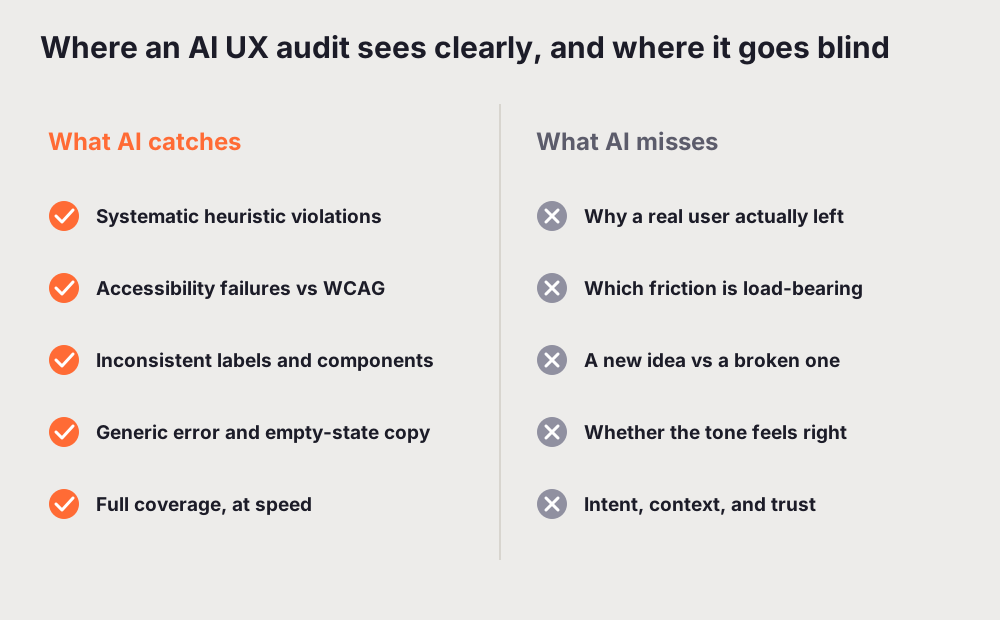
Systematic heuristic issues. Nielsen's ten heuristics, the conventions behind them, and the common ways interfaces break them are exactly the kind of pattern a model has seen thousands of times. Missing feedback after an action, no visible system status, no clear way back, controls that do not look like controls. These are rule-shaped problems, and rules are what machines apply well. A model will not get bored on page nineteen and start skimming, which is where human reviewers quietly miss things.
Accessibility failures. A large share of accessibility problems are checkable against a standard. Colour contrast below the WCAG 2.2 AA threshold, missing form labels, images with no alternative text, focus states that do not exist, heading levels that skip. An AI pass catches these at speed and across every page, which is more than most teams manage by hand. It will not replace real assistive-technology testing with actual users, but it will clear the systematic failures off your plate first. The same logic runs through our accessibility audit for SaaS guide: the checkable layer should be automated so humans can spend their time on the judgement calls.
Consistency problems. This is one of AI's quiet strengths. A person auditing a product sees one screen at a time and forgets the exact wording of a button they saw twenty minutes ago. A model can hold the whole surface at once and notice that you call the same object a workspace here, a project there, and a board in settings, or that your primary button is three slightly different shades of the same orange. Consistency issues are hard for humans precisely because they require near-perfect memory across the whole product, and that is a machine's home turf.
Content and copy clarity at the pattern level. Generic error messages, empty states with no guidance, vague labels, walls of text where a sentence would do. A model flags these reliably because they match well-known anti-patterns. It will tell you that "Something went wrong" is a weak error. What it will not tell you is whether the specific rewrite lands with your particular audience, which is the human half of the job.
Coverage at speed. This is the real headline. A human audit of a large product is a project. An AI pass over the same product is minutes. That speed changes what an audit is for. You can run one on every release, on a competitor, or on a flow you just shipped, without booking anyone's week.
Notice the shape of that list. Every item is a pattern with a known right answer, or close to one. That is the domain where AI is strong, and it is genuinely strong there. If your only comparison is a rushed manual review that ran out of time before it reached the accessibility checks, the tool wins on coverage alone. This is also why a purely technical scan and a UX audit are not the same thing, a difference we pull apart in UX audit vs Lighthouse.
What an AI UX audit misses
Now the other side, and this is the part the marketing tends to skip. There are whole categories of UX insight that an AI-powered audit cannot reach, because they depend on things the model does not have: context, intent, and lived reaction.
Intent and context. A model can see that a form has eight fields. It cannot know that six of them are legally required for your industry, or that the two optional ones are the reason your sales team closes deals. It flags friction without knowing which friction is load-bearing. A human who understands the business can tell the difference between a step that is annoying and a step that exists for a reason. The machine treats both as findings, and some of the time it is wrong about which to cut.
Novel mental models. AI is a conservative critic. It compares your product to convention, so anything that departs from convention reads to it as an error, even when the departure is the whole point of the product. Genuinely new interaction models, the ones that feel strange for a week and obvious forever after, are exactly what an audit-against-precedent penalises. If your product is doing something new on purpose, an AI audit will often mark your best idea as a bug. A human evaluator can ask the harder question: is this confusing because it is broken, or confusing because it is unfamiliar and worth learning?
The deep qualitative why. This is the big one. An AI audit tells you what looks wrong. It cannot tell you why a real person abandoned your checkout, because the why lives in a head the model cannot see. Someone left because they did not trust you with their card, or because the price felt higher than they expected, or because a word on the button meant something different to them than it did to you. You only learn that by watching real people and asking them, which is the whole point of usability testing. We go deep on that split in heuristic evaluation vs usability testing: expert-style evaluation, which is what AI automates, finds where a design breaks a rule, while watching users finds where a design breaks a person.
Emotional and brand nuance. Whether your product feels trustworthy, warm, premium, or cheap is a human read. A model can check contrast ratios. It cannot feel that your confirmation screen is cold, or that a jokey error on a serious flow will make an anxious user trust you less. Tone is judged by people, in context, against a brand the machine only half understands.
The pattern here mirrors the catches list almost exactly. Everything AI misses depends on knowing a specific human in a specific situation, and everything it catches is a rule that holds regardless of who the user is. That symmetry is the most useful thing to carry out of this whole article.
Where AI plus a human beats either alone
So the interesting answer is not "use AI" or "use humans". It is a sequence, and the order matters.
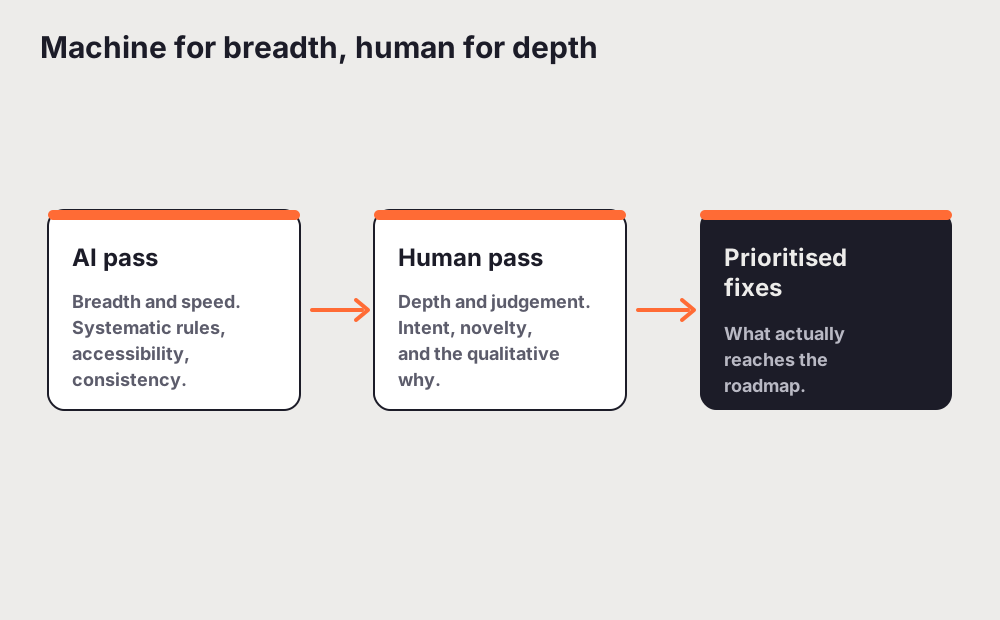
Run the AI pass first, for breadth. Let it sweep the whole product and clear out the systematic issues: the accessibility failures, the inconsistencies, the weak copy, the broken heuristics. This is the tedious layer, the part a human does slowly and imperfectly, and getting it done in minutes frees your best people from the grind. You walk into the human review with a map of every rule-shaped problem already marked.
Then spend the human time where only a human can help. Take the flows that matter to revenue and retention, and walk them as a real user with a real goal. Ask the questions the machine cannot: does this friction earn its place, is this unfamiliar thing broken or just new, why did the last handful of users stall right here. Where you can, put the product in front of actual people and watch. The AI pass told you where the product breaks the rules. The human pass tells you where it breaks the person, and which of the machine's forty findings actually deserve a place on the roadmap.
This is also the honest way to read any AI-generated report, including one from UXAuditPro. Treat the output as a strong first draft of the systematic layer, not as the verdict. Use it to skip the boring part and to make sure nothing obvious slipped through, then apply the judgement the tool cannot have. The score is a starting point for a conversation, not the end of one. If you are weighing up different tools for that first pass, our roundup of the best UX audit tools compares them on exactly this: how good is the systematic layer, and how much human work is left after.
How to build the combined audit into your process
You do not need a heavy process. You need to put each half where it belongs.
Start every audit with an automated pass so the breadth is handled and consistent. Fix the clear systematic failures directly, because arguing in a meeting about a missing form label is a waste of everyone's time. Then take the findings that involve judgement, the ones about whether a flow makes sense or a step is worth keeping, and put them in front of a person who knows the product and the user. For the highest-stakes flows, add real usability testing, because that is the only place the deep why appears. If you are formalising this, how to do a UX audit gives you the scoring and reporting structure to hang both halves on.
The teams who get this wrong are the ones who pick a side. The automation-only team ships an accessible, consistent product that nobody quite wants, because they never asked why. The manual-only team runs out of budget on page ten and never checks the other forty pages at all. The combined approach is not a compromise between the two. It is each method doing the part it is actually good at.
The takeaway
An AI-powered UX audit is very good at catching what is systematically wrong and completely blind to what is contextually wrong. It finds the broken rules and misses the broken intent. That is not a flaw to apologise for, it is a boundary to design around. Run the machine for breadth, speed, and the tedious rule-shaped layer, then spend your human hours on intent, novelty, and the qualitative why that only a person watching a real user can reach. Use it for what it catches. Cover, yourself, for what it misses.
Related reading: Best UX Audit Tools in 2026, Compared and Ranked
Frequently asked questions
What is an AI-powered UX audit?
An AI-powered UX audit is pattern recognition at scale. A model looks at your pages, components, copy, and structure, compares what it sees against a large body of usability and accessibility conventions, and flags where your product departs from them. Some tools work from a URL, some from screenshots, some from the code. The output is usually a scored list of issues with a severity and a location. It is very good at rule-shaped problems and blind to anything that depends on knowing your specific user, business, or intent.
What does an AI UX audit reliably catch?
The categories where there is a known right answer: systematic heuristic violations, accessibility failures that are checkable against WCAG 2.2 AA, inconsistent labels and components across the whole product, generic error messages and empty states with no guidance, weak visual hierarchy, and low colour contrast. Its biggest strength is coverage at speed: it can sweep an entire product in minutes without getting tired or skimming the last few pages, which is where human reviewers quietly miss things.
What does an AI UX audit miss?
Everything that depends on context, intent, and lived reaction. It cannot tell which friction is load-bearing (a required step versus a needless one), it treats a genuinely new interaction model as an error because it grades against convention, and it cannot know the deep qualitative why: the real reason a person abandoned your checkout, which lives in a head the model cannot see. It also cannot judge whether your tone feels trustworthy or cold. Those are human reads.
Can an AI UX audit replace a human UX expert?
No, and it is not trying to. AI is fast and consistent and covers a lot of ground, which makes it a strong baseline for the systematic layer. A human still adds the judgement a tool cannot: interviewing real users, weighing trade-offs, deciding which of the machine's findings actually matter, and designing the fix. The strongest approach uses an AI pass for breadth and a human pass for interpretation and solution design.
How do you combine AI and human review in one audit?
Run the AI pass first, for breadth. Let it clear the systematic issues across the whole product so your best people are not doing that grind by hand. Then spend human time where only a human can help: walk the flows that matter to revenue and retention as a real user, ask whether each friction earns its place, and for the highest-stakes flows put the product in front of actual people and watch. The AI pass tells you where the product breaks the rules; the human pass tells you where it breaks the person.